







More companies now run multilingual websites, sell abroad, or receive messages from customers in several countries. The problem starts when a customer writes in German, French, Italian, Czech, or another language, while the person on your side knows the product but not the customer’s language.
The usual workflow is clumsy: copy the message into a translator, understand the context, write a reply, translate it back, and paste it into the chat. It works for a while, but it is slow, tiring, and easy to get wrong.
That is why many teams look for a website chat with automatic translation. Not to replace support agents, but to remove the language barrier from everyday customer conversations.
What is a website chat with automatic translation?
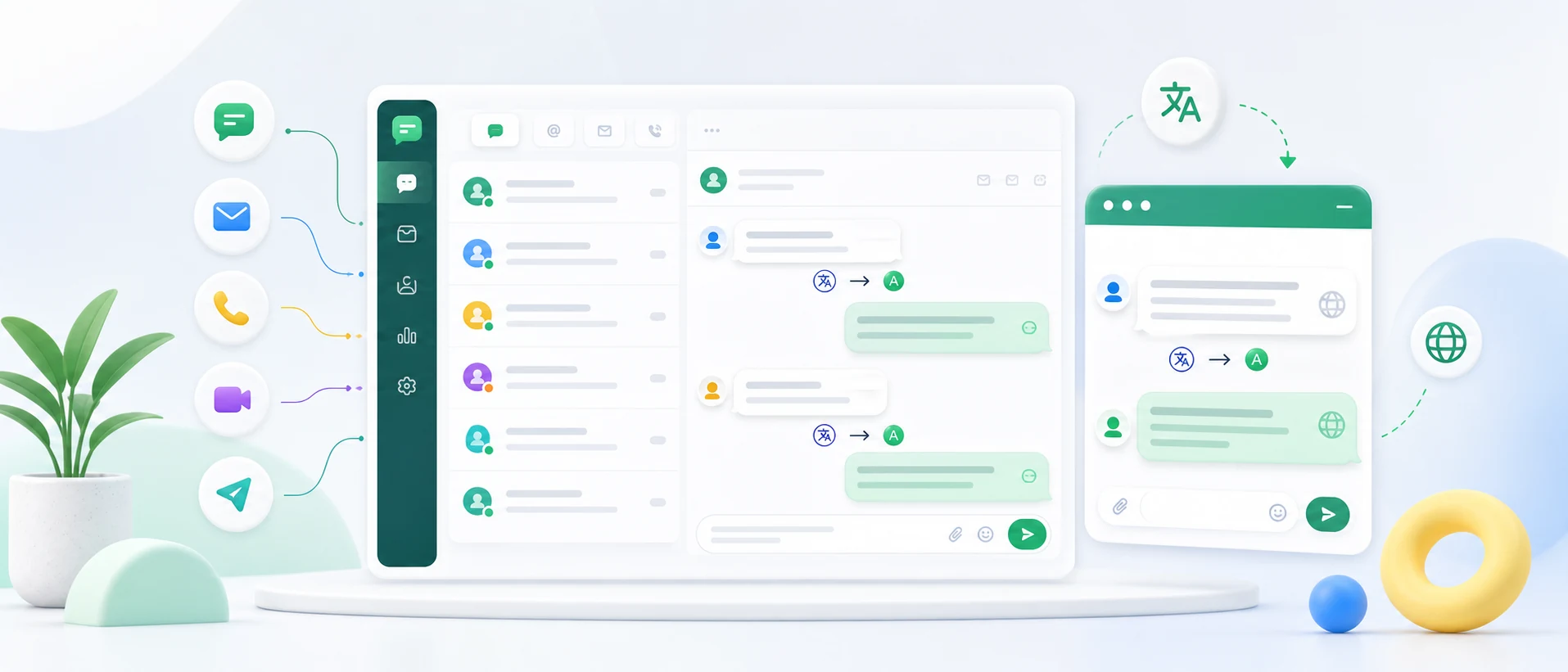
A chat with automatic translation works in a simple way. The customer writes in their own language. Your agent sees the message in their working language, replies naturally, and the customer receives the answer translated back into their language.
For example:
- the customer writes in German,
- the agent sees the message in English or another internal language,
- the agent replies in that internal language,
- the customer receives the reply in German.
It is still a human-to-human conversation. The difference is that translation happens in the background, so the team can focus on solving the customer’s problem.
Why is a standard live chat not always enough?
A standard live chat solves one important problem: it lets visitors contact your company quickly from the website. But it does not solve every support challenge.
When you serve international customers, you may still run into issues:
- customers write in languages your team does not speak,
- messages arrive from several markets at once,
- agents translate conversations manually,
- replies take longer,
- context gets lost between tools,
- the team works across too many separate apps.
For a purely local business, a simple live chat may be enough. If you have a multilingual website, sell across borders, or receive international enquiries, the language of the conversation becomes just as important as the channel.
Who benefits most from chat with translation?
Automatic chat translation is useful wherever a company talks to customers, partners, or contractors from different countries.
Online stores
E-commerce teams often start international sales by translating the store, adding cross-border shipping, and launching ads. Then customers begin asking about delivery, returns, payments, claims, order status, and product details.
A translated chat helps answer these questions faster, without hiring a separate person for every language.
Manufacturers, exporters, and distributors
In B2B, conversations often involve quotes, catalogues, availability, transport, spare parts, service, or distribution. Your team may understand the product very well, but not always the customer’s language.
Automatic translation helps handle enquiries from Germany, Czechia, France, Italy, Spain, and other markets, especially after trade fairs, campaigns, or a new multilingual website launch.
Hotels, clinics, and service companies
Language barriers also slow down service businesses. A guest asks about a booking, a patient about an appointment, a customer about an available date, and a tourist about an offer. If the message arrives in an unfamiliar language, the reply is delayed or translated manually.
A website chat with automatic translation shortens that process and helps the team respond faster.
Automatic translation vs copying messages into a translator
The simplest way to handle foreign-language messages is to copy them into an online translator. For one message a day, that may be acceptable. For several or dozens of conversations, it becomes a real loss of time.
Manual translation means switching between tools, copying text back and forth, risking the wrong pasted answer, responding more slowly, and losing a clean conversation history.
Automatic translation inside the chat makes the process smoother. The agent reads, replies, and moves on.
For a deeper look at response time, CSAT, and practical implementation, see our guide: Automatic translation in customer support - how it works.
Should AI answer customers on its own?
Not always. For many companies, the safer and more practical model is: a human answers, the system translates.
The agent still decides what to say. They know the company context, product, order, complaint, or offer. The system only removes the language barrier.
This matters in industries where answers must be precise: manufacturing, trade, service, healthcare, tourism, export, and B2B. Automation should help the team, not take control of the conversation away from it.
What about messages from other channels?
Customers no longer write only through a contact form. One person uses website chat, another Messenger, another WhatsApp, and someone else Instagram, Facebook, or email.
That is why live chat is often only one part of the problem. The second part is collecting messages from different channels in one place.
In practice, many companies need more than a chat widget. They need a simple customer support inbox where all channels meet and the team can manage conversations without jumping between tools.
How does Chataptor work?
Chataptor is an omnichannel inbox for customer messages. In one place, your team can handle website live chat, Messenger, WhatsApp, Instagram, Facebook, and email.
Chataptor also supports real-time automatic message translation:
- The customer writes in their own language.
- The agent sees the message in their working language.
- The agent replies in that language.
- The customer receives the answer in their own language.
It also works on mobile, so your team can reply from a phone when needed. Chataptor is currently free and has no message limit, so you can test this workflow without adding a new cost while exploring international markets.
When should you add chat with translation?
This type of solution makes sense if you have a multilingual website, receive messages from abroad, sell internationally, handle B2B enquiries, or see your team losing time to manual translation.
You do not need a large support department or hundreds of conversations per day. Sometimes a few valuable enquiries per month are enough for a fast reply in the customer’s language to matter.
Summary
A website chat with automatic translation is a simple way to support customers in many languages. The customer writes in their language, your team replies in its own, and the system translates the conversation in the background.
That helps companies respond faster to international customers without copying messages into translators and without hiring a separate person for every language.
When live chat, Messenger, WhatsApp, Instagram, Facebook, and email all land in one inbox, customer support becomes easier to manage. Start using Chataptor for free.
Keep reading
Related guides
Live Chat for Website: How It Works, What to Choose and How to Add It
Looking for live chat for website use? Learn how website chat works, which features matter, how to install a widget and choose the right software.
Customer support from your phone: how to reply faster away from the office
See how a mobile customer support app helps teams reply faster to messages from live chat, Messenger, WhatsApp, Instagram, Facebook and email.
Smartsupp alternatives: which live chat should you choose?
Compare practical Smartsupp alternatives, including Chataptor, tawk.to, Tidio, LiveChat, Crisp, Intercom and Zendesk, for live chat, customer support, omnichannel inboxes and automatic translation.